

Like almost everyone else who grew up around computers, I started with membrane keyboards. They were the standard, the “default” choice that came with the PC. But eventually, the noise surrounding mechanical keyboards becomes too loud to ignore. You start seeing the custom builds, the vibrant RGB lighting, and hearing that distinct “thock” in office spaces or gaming setups.
If you are currently sitting at a membrane board wondering if it’s worth the jump, I’m here to tell you: it is. But more importantly, I’m here to tell you that once you make the switch, there is no going back.

Gaming vs. Productivity Brands
When you begin your transition, the first question you need to ask isn’t about colors or sounds; it’s about intent. Are you buying this for pure gaming, or for serious productivity?
In my experience, this distinction is the fork in the road. On one side, you have the brands that cater primarily to gamers, such as Razer. These boards are built for speed and aesthetics, often leaning heavily into aggressive designs and complex RGB ecosystems.
On the other side, you have brands like Keychron that focus more on the typing experience. These lean toward minimalism and simplicity, often featuring clean, plain colors and subtle backlighting. While these are geared toward people who write or code for a living, don’t let the “productivity” label fool you. They are incredibly versatile and perform just as well in a gaming session as they do in a spreadsheet.
Switch Types: Linear, Tactile, and Clicky
This is where the hobby gets personal. In the mechanical world, sound and feel are everything. You’ll hear enthusiasts talk about “Thock,” that deep, satisfying, marbly sound, versus “Clicky” sounds that mimic a typewriter.
This experience is determined by your switch type. Generally, you’re choosing between three categories:
- Clicky/Tactile: These provide physical feedback and a sharp sound. They are great if you want to feel every single letter you type.
- Linear: These offer a smooth, uninterrupted press from top to bottom. They are often preferred by gamers for their speed and consistency.
To get a better sense of how these internal components actually sound in practice, you can listen to various comparisons online. For example, here is a video from the channel NoTalkJustAction showcasing the sounds of the Outemu line of switches, which are a common entry point for many new mechanical keyboard users:
(Credits: NoTalkJustAction)
Cost and Component Longevity
Let’s be honest: mechanical keyboards are significantly pricier than membrane ones. However, I view this as a “one-time” investment. When a membrane keyboard breaks, you usually have to replace the entire unit. With a mechanical board, you buy the “base,” and if a switch fails or you want a different feel, you can replace individual switches for a fraction of the cost.
I should mention that for some, this becomes an expensive hobby. There are enthusiasts who spend more on a single keyboard than most people spend on their entire computer. While that is an option, you don’t need to spend a massive fortune to enjoy the benefits. A solid mechanical board is a tool, not just a collector’s item.
Form Factor and Layout Options
Most membrane keyboards use a “100% layout,” meaning they include the full number pad (numpad). Switching to mechanical gives you the chance to reclaim your desk space.
The first decision is the numpad. If you don’t do heavy data entry, you might prefer a TKL (Tenkeyless) layout. It is smaller, more ergonomic, and gives your mouse more room to move. Beyond that, you can go even smaller, such as 60% or 65% layouts.
One feature I’ve found indispensable is a physical volume knob. My current headphones don’t have built-in controls, and reaching for a software slider mid-game or mid-meeting is inconvenient. A dedicated knob on the keyboard is a small addition that provides massive utility.
If you are hesitant to lose the numpad but want a smaller desk footprint, there is a middle ground. You do not have to commit to a bulky 100% layout just for the sake of occasional data entry.
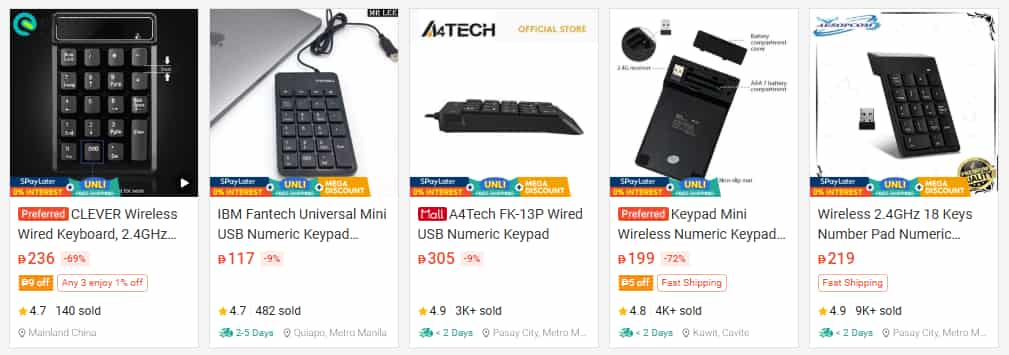
Many users opt for a smaller board for daily use and simply purchase a separate, external mechanical numpad from online stores like Shopee or Lazada. These units are relatively inexpensive and allow you to keep your desk clear while having the numpad ready in a drawer for when you actually need it.
Brand Reliability
If you’re looking for a place to start without overspending, I personally use a keyboard from Rakk. It is a TKL board from a very reliable brand that proves you don’t need to spend a high amount to get a high-quality experience.
While I am not affiliated with them, I have a personal bias toward Rakk Gears. They have built a strong reputation as a local brand that provides high-quality peripherals at accessible prices. They were one of the first brands to make mechanical keyboards feel like a viable option for those of us who didn’t want to overspend on international names. It is important to remember that as you get deeper into the mechanical keyboard game, you will likely develop your own biases based on what you value in a board.
Lastly, consider your connection type. While wireless looks clean, I almost always recommend staying wired. It is more affordable, you never have to worry about battery health, and unless you’re frequently moving your keyboard to use with a laptop, the reliability of a cable is hard to beat.
Switching to a mechanical keyboard is about upgrading the primary way you interact with your computer. It is a more tactile, audible, and customizable experience than any membrane alternative. Once you feel the difference, those mushy membrane keys will feel like typing on wet cardboard.